
What’s the V-number for the last subbie you paid? Not the UTR, not the NINO — the verification reference HMRC gave you when you verified them. If you can’t picture it in the next thirty seconds, that’s the gap most contractors are sitting on.
The verification step takes about ten minutes the first time you do it for a subbie. Done properly, it lasts you up to three tax years and keeps every CIS300 line you ever file for that subbie clean. Done badly — skipped, half-finished, or using mismatched data — it triggers HMRC’s 30% unverified rate, locks the subbie out of recovering the difference for months, and shows up as a query on your next return.
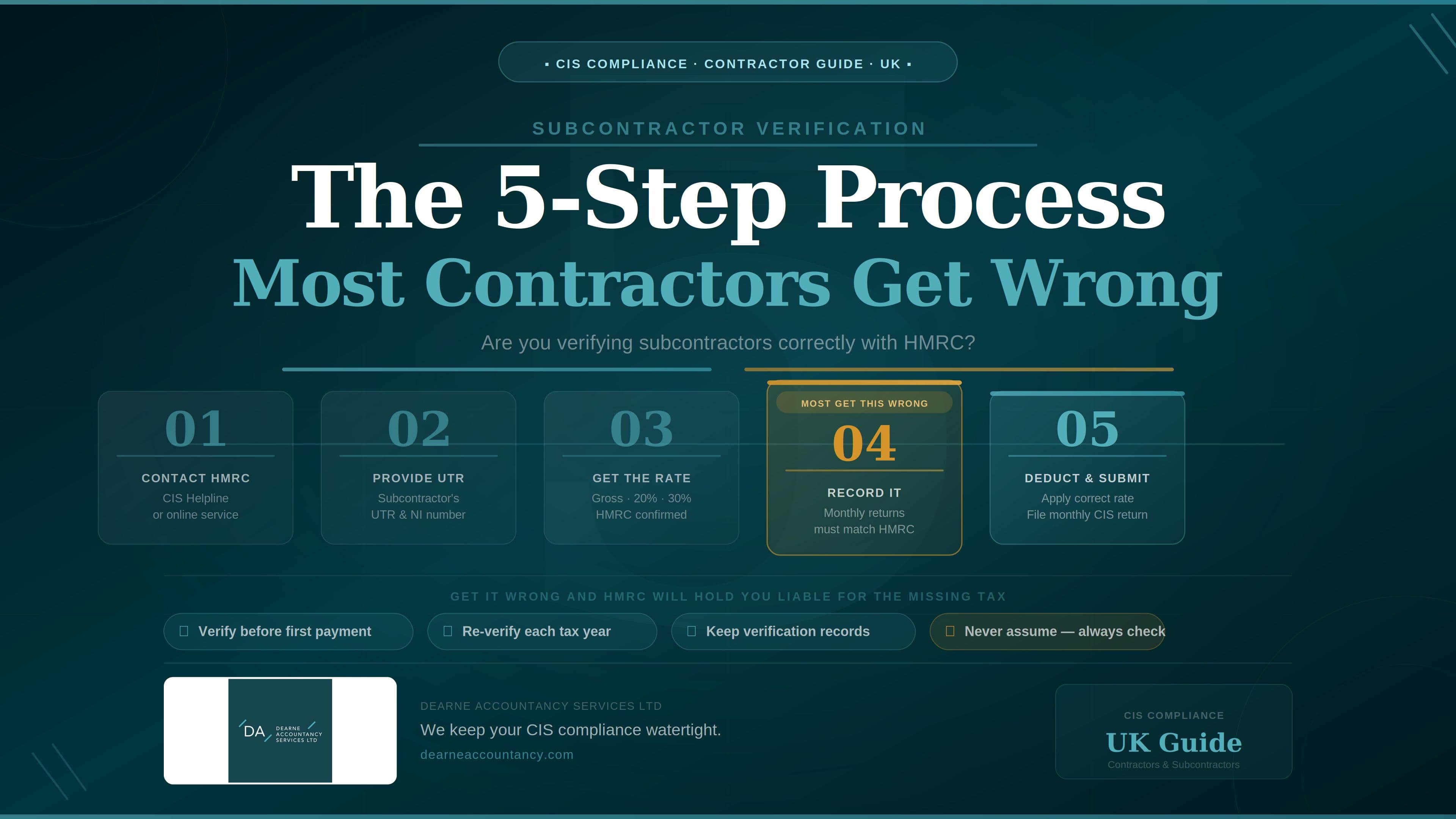
I’m Sarah Bingham. I run Dearne Accountancy Services for construction contractors across South Yorkshire and West Yorkshire. The wider monthly-cycle context for filing CIS300s sits in our CIS300 monthly return guide; the broader construction-accounting picture lives on the Construction Accountants hub. This piece zooms into the verification step alone — the one most contractors get wrong — in five clean steps.
Step 1: Get the subbie’s ID data right before you start
The verification call to HMRC takes about a minute if your data is correct, and bounces back unmatched if any piece is even slightly wrong. Before you go anywhere near the portal, get a clean data set from the subbie.
Ask the subbie in writing for the exact details that match their HMRC registration. Don’t take it off an invoice header; invoice headers carry trading names, abbreviated forms, addresses that drifted. You want the data as HMRC sees it.
What you need by entity type:
- Sole trader: the subbie’s full legal name (the one on their Self Assessment record), their Unique Taxpayer Reference (UTR — 10 digits), and their National Insurance number. NI numbers that start “TN” or that are just two digits are placeholders and won’t verify — ask for the real one.
- Limited company: the company’s full registered name as it appears on Companies House, the Company UTR (issued by HMRC for Corporation Tax — different from any director’s personal UTR), and the Companies House registration number (CRN — usually 8 digits, sometimes with a “SC” or “NI” prefix for Scottish or NI companies).
- Partnership: the partnership’s trading name, its Partnership UTR (different again from any individual partner’s UTR), and the nominated partner’s name and personal UTR.
Common subtle errors to head off before they cost you a verification attempt:
- Director’s personal UTR submitted instead of the Company UTR for a Ltd.
- Partnership name typed in instead of trading name where the two differ.
- Limited-company number missing its “SC” prefix for Scottish-incorporated firms.
- Subbie hasn’t actually registered for CIS yet — they’re CIS-aware but haven’t completed the HMRC form (you’ll only find out when verification comes back unmatched).
A two-minute email to the subbie asking for the data exactly as their HMRC paperwork shows it removes most of the unmatched-verification cases I see on incoming reviews.
Step 2: Run the verification
You verify in one of two places: HMRC’s CIS online service via your business tax account at tax.service.gov.uk, or directly within commercial CIS-enabled software (Xero, QuickBooks, FreeAgent, Sage, plus standalone CIS tools). The mechanic is the same; the software route files the V-number to the subbie record automatically.
The portal flow: open the CIS service, choose “Add a subcontractor”, select the entity type (sole trader / Ltd / partnership), enter the data from Step 1, submit. HMRC’s CISR system runs an exact-match check against its records and returns one of three outcomes within seconds.
The three outcomes and what each one means:
| Outcome | What HMRC returns | What you do |
|---|---|---|
| Matched — gross (0%) | V-number in the format V9999999999AA and a “no deduction” instruction | Pay gross. File the V-number against the subbie record. |
| Matched — net (20%) | V-number in the format V9999999999AA and a “deduct at 20%” instruction | Deduct 20% from labour. File the V-number. |
| Unmatched (30%) | V-number with /A suffix, e.g. V1234567890/A | Deduct at 30% on every payment until the subbie resolves their registration, or hold the payment. Pass the unmatched V-number to the subbie. |
(V-number format per HMRC’s CIS Quality Standard & Business Validation Specification.)
Worked example — a partnership that doesn’t match first time. A Doncaster groundworks partnership submits an invoice. You verify: the trading name on the invoice (“Eastfield Civils”) matches the partnership’s HMRC name; the nominated partner is correct; but the Partnership UTR you’ve been given is actually the nominated partner’s personal UTR. Verification returns unmatched with VR V8472103950/A. You email the subbie that day asking for the actual Partnership UTR — they send it across, you re-verify, the second attempt returns matched (V8472103950AB) at 20%. The unmatched VR stays in your records as evidence of the prior attempt; the matched one drives the deduction going forward.
Step 3: File the V-number against the subbie
The V-number isn’t a one-time confirmation you can forget about. It’s a permanent identifier you need on file for as long as you keep paying that subbie, and it has to appear on the CIS300 line for the first month you pay them.
Three places the V-number needs to land:
- Your subbie master file — alongside the UTR, NINO/CRN, trading name, deduction rate, and verification date. On accounting software, this is the subbie’s contact record. On a spreadsheet, this is the verification log column.
- The first CIS300 you file for the subbie — the V-number goes on the subbie’s line as the verification reference. After the first appearance, subsequent months don’t need it again unless something changes.
- The Payment and Deduction Statement (PDS) — included alongside the deduction rate so the subbie’s accountant can tie it back to HMRC’s records at year-end. For Ltd subbies that’s the EPS-offset route covered in our Ltd CIS-suffered guide; for sole-trader subbies it feeds the Self Assessment refund claim.
The unmatched V-number gets the same treatment as the matched one if you decide to proceed and deduct at 30%. Don’t discard it because it has a /A suffix — HMRC uses it to track the subbie’s eventual registration and your eventual return to a matched record.
If the subbie later resolves their registration, HMRC sends a CIS316B notification confirming the new payment status. From that point you apply the new rate to future payments and you do not need to re-verify. The CIS316B is the trigger; the subbie’s verification status updates on HMRC’s side automatically.
The V-number file matters at takeover too: when I onboard a new contractor client, the first thing I want to see is the verification log. Missing V-numbers mean missing verifications, and missing verifications mean a queue of 30% deductions that probably should have been 20%.
Step 4: Apply the right rate from day one
The rate verification tells you to use isn’t a recommendation. It applies from the first payment to the subbie and stays in force until HMRC changes it (via a CIS316B) or until the 2-year gap rule kicks in.
Three live rates, three different handling patterns:
- 0% (Gross Payment Status): pay the full invoice with no CIS deduction. Don’t skip filing the V-number on the CIS300 because the deduction is £0 — you still record the gross payment and the verification reference.
- 20% (standard): deduct from the labour portion only. The materials exemption knocks out VAT, consumables, fuel, plant hire, prefab materials and any materials the subbie paid for directly.
- 30% (unverified): deduct from the labour portion using the same materials exemption. Communicate the rate to the subbie clearly so they don’t expect 20%.
“HMRC says higher rate” — what’s actually causing it. When verification comes back at 30% it’s usually one of these:
- Subbie hasn’t registered for CIS yet (most common).
- Subbie registered but mistyped a detail on their CIS registration form (NINO transposition, name initial vs full name, address mismatch).
- Subbie was once registered but their record was closed by HMRC, often because they stopped trading and reactivated.
- Subbie has GPS that’s been revoked for non-compliance (HMRC reviews compliance annually).
The recovery path in each case sits with the subbie, not you. You can’t fix their registration from your end. What you can do is deduct at 30% in the meantime, document the unmatched V-number, hand it to the subbie, and apply the corrected rate the moment the CIS316B lands.
Many of my Yorkshire contractor clients hold the payment instead of deducting at 30%, on the grounds that the 10% gap creates more friction with the subbie than holding the payment for a week does. Either approach is defensible. Neither approach lets you deduct at 20% on faith that the subbie’s “definitely registered, honest.”
Step 5: Re-verify on the 2-year clock
This is the step almost nobody calendars properly. The 2-year re-verification rule is the trap.
The rule: if a subbie hasn’t appeared on any of your CIS300 returns in the current tax year or either of the previous two tax years, you have to re-verify them before the next payment. Same process as the first verification; new V-number; new rate confirmation.
The arithmetic. A subbie you used in 2023/24 but not in 2024/25 or 2025/26 needs re-verifying for any 2026/27 payment. The clock counts whole tax years (6 April to 5 April), not 24 calendar months from the last invoice. So a subbie you last paid in March 2024 — even if “only two years ago” by calendar — has already missed two complete tax years (2024/25 and 2025/26) by April 2026.
The trap: because re-verification is invisible until it’s wrong, contractors tend to assume any subbie they “used a while back” is still verified. Then HMRC’s CISR check on the CIS300 flags an unverified payment and the contractor’s into a query.
The fix is a simple calendar discipline: at the end of each tax year (early April is the cleanest moment), review your subbie master file. Any subbie last appearing on a CIS300 two or more tax years ago goes onto a “re-verify on next use” list. The five-minute review removes the entire risk class.
If you’ve got hundreds of subbies on the books across several years, that review gets unwieldy by hand. Our CIS returns service runs the 2-year check automatically each April and flags every subbie due for re-verification before their next payment.
Frequently asked questions
Can I batch-verify multiple subbies at once?
Yes, via commercial CIS software. Xero, QuickBooks, FreeAgent and Sage all batch-verify in a single submission. HMRC’s own online service is one-at-a-time. For a contractor onboarding a new site team of ten subbies in a week, software is the only practical route.
How long is a verification valid for?
Until the subbie hasn’t appeared on any of your CIS300 returns for the current tax year and both of the previous two tax years, OR until HMRC changes the rate via a CIS316B notification — whichever comes first. In practice, for a subbie you pay regularly, the verification rolls forward indefinitely.
What if HMRC’s verification service is down on the day I need to pay a new subbie?
Service-availability outages happen but are rare and usually brief. HMRC’s published advice is to retry. If you must pay on the day and verification is genuinely unavailable, treat the subbie as unverified (deduct at 30%) and re-run the verification the moment service is back. Document the outage attempt in case HMRC queries the higher-rate deduction later.
What happens if I forget to verify and pay at 20% anyway?
HMRC’s CISR check on your CIS300 will flag the payment as unverified. The £100 late-filing penalty regime doesn’t apply (the return was on time), but HMRC will issue a correction notice and either chase you for the 10% under-deduction or — more commonly — adjust the subbie’s CIS-suffered figure on their downstream claim. Either way it’s an admin tangle. Verify first, pay second.
Want a free CIS verification audit?
If you’re a Yorkshire contractor and you can’t immediately put your hands on V-numbers for every subbie you’ve paid in the past two years, that’s the gap. I run a free 30-minute CIS verification audit for new contacts — bring your subbie master file and the last two years of CIS300s, and I’ll tell you exactly where the missing verifications, expired V-numbers and 2-year-rule gaps are sitting. Get in touch.